 StakerHouse
Validator monitoring: a practical guide for Ethereum, Solana and Cosmos
· 43 min read
How to monitor a validator node and its server: what to watch, which alerts to set and what to do when they fire, on Ethereum, Solana, Cosmos and Polkadot.
A validator rarely fails in a way a CPU graph would show. The server can look healthy while the node sits on a height that stopped moving. The node can report itself synced while the validator misses every vote because its signer dropped the connection. And when the machine goes down, every tool running on it goes quiet at the same moment.
That is why validator monitoring works in layers. To monitor a server that runs a blockchain node or validator, watch four things: the host (disk, memory, CPU, network and clock), the node software (sync, peers and whether the head is moving), the validator's duties on chain (missed blocks, attestations or votes, and jailing or delinquency), and an outside view that still works when the server is down. Page on the signals that cost money soon. Keep everything else on a dashboard.
If you set up only a handful of alerts, make them these:
- Server down, checked from somewhere other than the server itself.
- Node process down or restarting in a loop.
- Node behind the network, or its head stopped moving.
- Validator missing duties: blocks, attestations or votes, or a status change to jailed, delinquent or inactive.
- Disk full within a day, predicted from the fill rate rather than a fixed percentage.
- Drive failing or worn out, from SMART or NVMe health data.
- Clock not synchronized.
- Monitoring gone silent: a heartbeat that alerts you when your own alerting stops.
Below, each layer in turn, then health checks, metric names and alert rules for Ethereum, Solana, Cosmos SDK chains and Polkadot, followed by a tool comparison, common failures and the security mistakes to avoid. StakerHouse runs validators on Cosmos SDK and Substrate networks; the Ethereum and Solana sections are built from the client teams' documentation, linked throughout, because flags and metric names change between versions.
In this guide
- The four layers of validator monitoring
- The alerts every validator needs
- Monitoring the server
- Monitoring the node software
- Ethereum: execution, consensus and validator clients
- Solana: delinquency, admission and skip rate
- Cosmos SDK chains: CometBFT, missed blocks and Tenderduty
- Polkadot and other Substrate chains
- Watching from the outside
- Which tool covers which problem
- Dashboards and historical data
- Alert routing, severity and noise
- Common failures and what to do
- Security
- Frequently asked questions
The four layers of validator monitoring
Each layer answers a different question, and each catches failures the others miss.
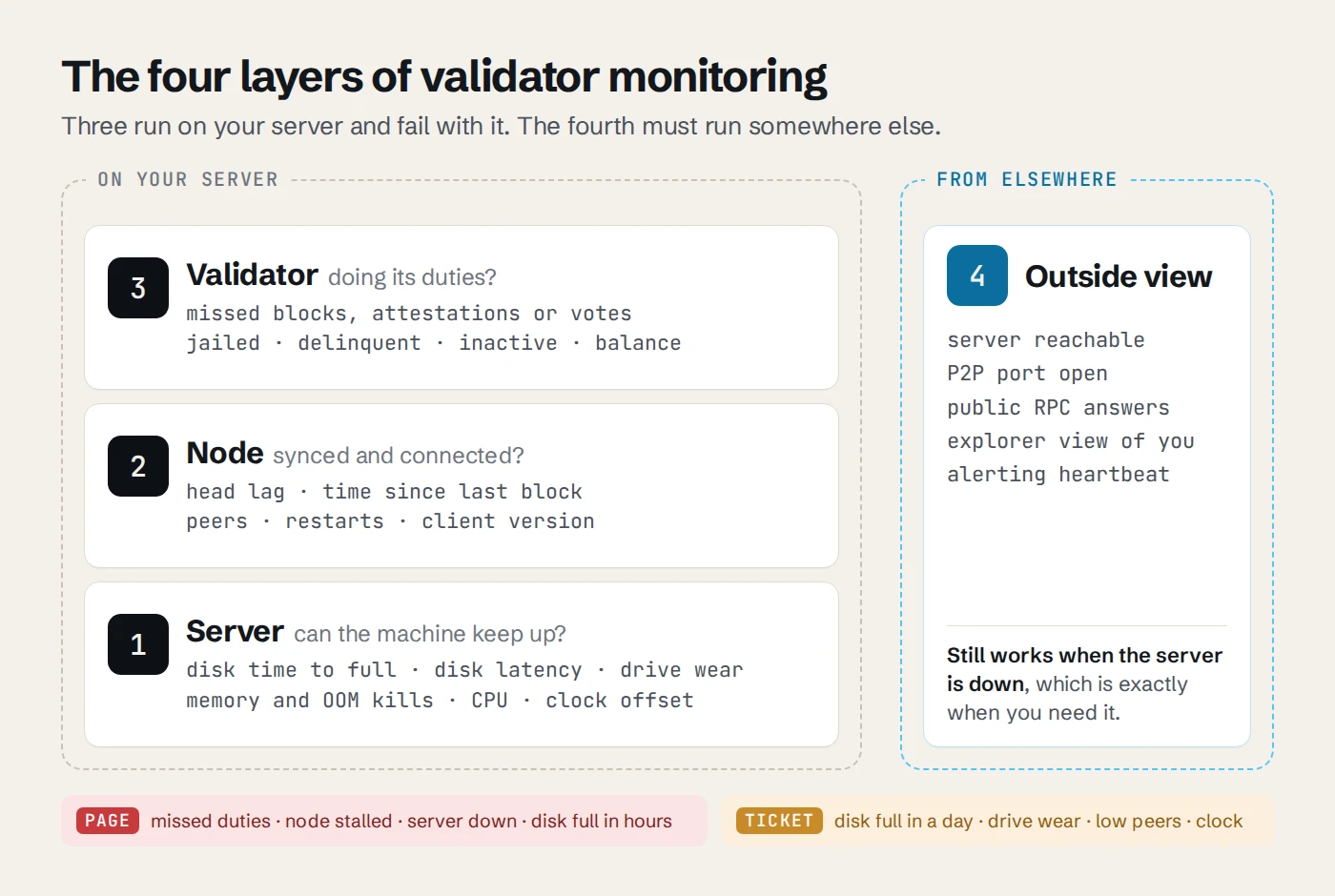
| Layer | What it tells you | Signals to watch | Typical tools |
|---|---|---|---|
| 1. Server | Whether the machine can keep up | Free disk and time to full, disk latency, drive health, available memory and OOM kills, CPU iowait and steal, network errors, clock offset, failed services | node_exporter with Prometheus, a hosted agent such as Monitorable, Netdata |
| 2. Node | Whether the client is running, in sync and connected | Head height or slot against the network, time since the last block, peers, restarts, client version | The client's metrics endpoint and health API |
| 3. Validator | Whether you are doing your duties | Missed attestations, blocks or votes; jailed, delinquent or inactive status; proposals; balance | Lighthouse validator monitor, beaconcha.in, agave-watchtower, Tenderduty |
| 4. Outside view | Whether the network can reach you, and whether your monitoring is alive | P2P port reachable, public endpoints answering, your validator as explorers see it, a heartbeat from the alerting stack | blackbox_exporter, Uptime Kuma, Gatus, a heartbeat service |
Three failures show why you need all four:
- The chain halts at an upgrade height. Host metrics are normal and the node logs no errors; the head simply stops moving. Missed-block counters stay flat too, because nobody is producing blocks, so a missed-blocks alert stays silent. You need a "head stalled" alert.
- An NVMe drive degrades. The node falls behind long before anything fails outright. The server layer shows rising disk latency and media errors; the node layer shows the growing lag.
- The data center loses power. Everything on the server stops at once, including any Prometheus or Alertmanager running there. Only something running elsewhere notices.
Alert on symptoms, diagnose with causes
The validator and node layers tell you whether you are losing money right now. The server and outside layers usually tell you why. Page on symptoms: missed duties, a node that fell behind, a server that vanished. A CPU spike that did not delay a single vote should not wake anyone.
The exception is slow causes that predict an outage hours or weeks ahead: a disk that will be full tomorrow, an NVMe drive near the end of its rated endurance, a clock drifting out of sync. Those deserve alerts too, but alerts that land in a queue rather than on your phone at 3 a.m.
The alerts every validator needs
This is the minimum set, on any chain. The chain sections below turn each row into concrete signals.
| Alert | Fires when | Severity | First thing to check |
|---|---|---|---|
| Server down | No probe answer or agent report for 5 minutes, seen from outside | Page | Provider status and console, out-of-band access, network |
| Node process down | The service failed, or restarted 3 times in 30 minutes | Page | journalctl -u <service>, disk space, OOM kills |
| Node behind or stalled | Head behind the network by more than a few blocks, or no new block for several block times | Page | Has the chain itself halted? Then peers, disk latency, CPU |
| Validator missing duties | Missed attestations, blocks or votes above your threshold | Page | Node in sync? Signer connected? Clock in sync? |
| Validator status changed | Jailed, delinquent, inactive or out of the active set | Page | Fix the cause first, then unjail or catch up |
| Low peers | Peer count under your floor for 10 minutes | Ticket (page at zero) | Firewall or NAT changes, P2P port reachable, seeds and bootnodes |
| Disk filling | Predicted full within 24 hours (ticket) or 4 hours (page) | Ticket or page | What grew, pruning settings, room to expand |
| Drive failing or worn | SMART failure, new media errors, NVMe wear near 100 % | Ticket | Plan a migration before the drive decides for you |
| Memory pressure | The kernel's OOM killer fired | Ticket | Which process, memory trend, client flags |
| Clock not synchronized | Offset over 50 ms, or the clock reports unsynchronized | Ticket | chronyc tracking, NTP reachable |
| Upgrade due | A scheduled network upgrade is close and your binary is older | Ticket | Release notes, upgrade binary staged |
| Monitoring silent | The heartbeat from your alerting stack stopped | Page | Fix monitoring before anything else |
Thresholds depend on the chain. One missed block on a chain with six-second blocks is noise; missing blocks for most of a slashing window is not.
Monitoring the server
Node software is hard on hardware: databases that grow every day, random I/O that punishes slow disks, hundreds of peer connections and protocols that care about the clock. These are the server signals that matter most. Metric names are node_exporter's, for a Prometheus setup; any decent monitoring agent reports the same things.
Disk space: alert on time to full
Chain data only grows, and not at a steady rate: state growth, snapshots, logs and database migrations during upgrades can each take tens or hundreds of gigabytes. A fixed "85 % used" alert fires too late on a disk that fills fast and too early on one that barely moves. Alert on when the disk will be full instead.
The node_exporter project ships its own alert rules (the node-mixin). Its warning combines less than 40 % free with a linear prediction that the filesystem is full within 24 hours:
groups:
  - name: host
    rules:
      - alert: NodeFilesystemSpaceFillingUp
        expr: |
          (
            node_filesystem_avail_bytes{fstype!="", mountpoint!=""}
              / node_filesystem_size_bytes{fstype!="", mountpoint!=""} * 100 < 40
          and
            predict_linear(node_filesystem_avail_bytes{fstype!="", mountpoint!=""}[6h], 24 * 60 * 60) < 0
          and
            node_filesystem_readonly{fstype!="", mountpoint!=""} == 0
          )
        for: 1h
        labels:
          severity: warning
        annotations:
          summary: "{{ $labels.mountpoint }} on {{ $labels.instance }} will be full within 24 hours"
The mixin's critical version uses 20 % and four hours. Watch every volume the node writes to, the system disk where logs live, and inodes (node_filesystem_files_free) as well as bytes.
When it fires, df -h shows which volume and du -xh --max-depth=1 /path/to/data | sort -h shows what grew. Then prune, extend the volume or move data. Do not delete files from a running node's database by hand.
Disk latency and drive health
A disk that cannot keep up shows first as a node falling behind, not as a disk alert. Watch busy time and latency per device:
# Fraction of time the device had I/O in progress
rate(node_disk_io_time_seconds_total{device="nvme0n1"}[5m])

# Average read latency, in seconds
rate(node_disk_read_time_seconds_total{device="nvme0n1"}[5m])
  / rate(node_disk_reads_completed_total{device="nvme0n1"}[5m])
Read the first number with care: the iostat manual notes that for devices serving requests in parallel, "such as RAID arrays and modern SSDs", a busy figure near 100 % "does not reflect their performance limits". Latency next to it is the better guide. On the server, iostat -x 5 shows both.
Drive health deserves alerts of its own. NVMe drives report a "percentage used" estimate of their rated endurance, media errors and a critical-warning flag; SATA drives report reallocated sectors. Validator databases write all day, so track wear from the first week. Check by hand with smartctl -a /dev/nvme0, or with nvme-cli's nvme smart-log /dev/nvme0 (renamed nvme log smart in nvme-cli 3.0). For Prometheus, smartctl_exporter exports these as smartctl_device_smart_status, smartctl_device_percentage_used, smartctl_device_media_errors and smartctl_device_critical_warning.
Memory, CPU and the OOM killer
Watch available memory (node_memory_MemAvailable_bytes), not used memory: Linux fills free memory with page cache, and node databases lean on it. A client killed by the kernel's OOM killer usually restarts under systemd, so the only traces are a gap in the head height and a line in the kernel log. Count the kills instead; oom_kill is in node_exporter's default vmstat fields:
increase(node_vmstat_oom_kill[1h]) > 0
journalctl -k | grep -i "out of memory" tells you which process was killed.
For CPU, look past the total. Time in iowait points at the disk. Time in steal on a virtual machine is CPU the hypervisor gave to someone else, which on shared cloud instances can be enough to delay votes (rate(node_cpu_seconds_total{mode="steal"}[5m])).
Network: bandwidth, errors and connection tracking
Nodes keep many peer connections open, and some chains move a lot of data. Track traffic against your port speed and any monthly transfer quota from your provider, and track interface errors and drops (node_network_receive_errs_total, node_network_receive_drop_total). If connection tracking is active (a stateful firewall or NAT), watch the conntrack table too: when node_nf_conntrack_entries reaches node_nf_conntrack_entries_limit, the kernel drops new connections and peers quietly disappear. The node-mixin warns at 75 % of the limit.
Clock synchronization
Consensus runs on time. Ethereum's networking spec assumes no more than 500 ms of clock disparity between honest nodes (MAXIMUM_GOSSIP_CLOCK_DISPARITY), Lighthouse's FAQ lists a synced clock among the first checks for missed attestations, and Polkadot's validator guide warns that a drifting clock costs block authorship. A validator with a bad clock votes late or not at all while every other graph looks normal.
Run chrony (systemd-timesyncd implements only SNTP) and check it with chronyc tracking, or with timedatectl, which should say "System clock synchronized: yes". The node-mixin's two clock alerts:
- alert: NodeClockSkewDetected
  expr: |
    (node_timex_offset_seconds > 0.05 and deriv(node_timex_offset_seconds[5m]) >= 0)
    or
    (node_timex_offset_seconds < -0.05 and deriv(node_timex_offset_seconds[5m]) <= 0)
  for: 10m
- alert: NodeClockNotSynchronising
  expr: min_over_time(node_timex_sync_status[5m]) == 0 and node_timex_maxerror_seconds >= 16
  for: 10m
If you use chrony, enable its rtcsync option: node_exporter's time notes say every chrony version needs it to maintain the kernel flag that node_timex_sync_status reads.
Services, containers and restarts
Most nodes run as a systemd service with Restart=on-failure, or in a container with a restart policy. That is good for availability and bad for visibility: a client that crashes every twenty minutes looks "up" on most dashboards. Alert on failed units and on restart loops, and keep enough logs to see the first crash (journalctl -u <service> --since "1 hour ago").
node_exporter's systemd collector is off by default. Enable it with --collector.systemd to get node_systemd_unit_state; the node-mixin's failed-unit alert is simply node_systemd_unit_state{state="failed"} == 1. Restart counts (node_systemd_service_restart_total) need --collector.systemd.enable-restarts-metrics as well. Before a planned reboot for kernel updates, check the chain section below for when a restart costs least.
Option 1: Prometheus, node_exporter and Grafana
The self-hosted standard: node_exporter exposes host metrics on port 9100, Prometheus scrapes it along with your clients' metrics endpoints, Alertmanager routes alerts (with native receivers for email, Telegram, Discord, Slack, PagerDuty and webhooks, among others), and Grafana draws the dashboards. The "Node Exporter Full" dashboard (ID 1860) is a common starting point for the server layer.
# prometheus.yml (excerpt): scrape over a private network, never the public internet
rule_files:
  - /etc/prometheus/rules/*.yml
scrape_configs:
  - job_name: node
    static_configs:
      - targets: ["10.0.0.5:9100"]
        labels: { host: validator-1 }
  - job_name: cometbft
    static_configs:
      - targets: ["10.0.0.5:26660"]
        labels: { host: validator-1 }
A shared host label on every target of one machine pays off later: it lets Alertmanager tie a node's alerts to its server's.
Two caveats. The stack covers exactly what you scrape and write rules for, nothing more. And it is only as reliable as the machine it runs on: run it on a separate server, never on the validator, and give it a dead man's switch.
Option 2: a hosted monitoring agent
If you would rather not run and patch a monitoring stack for the server layer, a hosted agent covers it. Monitorable is one example: one open-source agent per Linux server, built on the OpenTelemetry Collector, reports CPU, memory, disk, network, systemd services, Docker containers, listening ports and SMART disk health every minute over outbound HTTPS, so the validator needs no inbound port for monitoring. Its default alert rules cover disk usage, failed systemd units and restart loops, SMART failures and drive wear, containers that die and a server that stops reporting for five minutes; a rule for a listening port that disappears, such as your P2P port, can be switched on. Alerts go to email, Telegram, Discord, Slack, PagerDuty, a webhook or ntfy, depending on the plan.
Its limits matter as much. It reads no chain data and runs no probes from outside: it will tell you cosmovisor.service failed or that port 26656 stopped listening, not that your validator missed a block or that peers can no longer reach you. Pair it, like any host-level tool, with the chain-specific checks below. Grafana Cloud (through its Alloy agent), Datadog and Netdata can also scrape your clients' Prometheus endpoints, with more setup and, on Datadog, custom-metric billing.
Monitoring the node software
Whatever the chain, a healthy node answers four questions:
- Is the head moving? Time since the last imported block or slot is the fastest stall detector.
- Is the head close to the network? Compare with a second source: another node of yours, a public RPC or an explorer. A node's own "synced" flag only reflects what its peers told it.
- Is it connected? Peer count, and whether it is falling.
- Is it on the right version? Network upgrades are scheduled for a block height or epoch. An outdated binary halts or forks off when that point arrives.
Clients answer these through a Prometheus metrics endpoint and a health or status API. Bind both to localhost or a private interface; the security section explains why.
Ethereum: execution, consensus and validator clients
An Ethereum validator is three programs. The execution client (Geth, Nethermind, Besu, Erigon or Reth) runs the EVM and the transaction pool. The consensus client, or beacon node (Lighthouse, Prysm, Teku, Nimbus or Lodestar), follows the beacon chain and drives the execution client through the Engine API on port 8551, authenticated with a shared JWT secret. The validator client holds the keys and performs the duties. Each needs watching, and so does the link between them.
The protocol keeps moving too. Fusaka brought PeerDAS to mainnet in December 2025, changing bandwidth and blob storage, and the next upgrade, Glamsterdam, had no mainnet date as of late October 2026 after its Hoodi testnet activation was postponed. Missing a fork is one of the few ways to take a healthy node offline overnight, so upgrade announcements belong in your monitoring too.
Execution client health
Three JSON-RPC calls answer the basic questions. The Content-Type header is required: Geth answers HTTP 415 without it.
RPC=http://127.0.0.1:8545
for m in eth_syncing eth_blockNumber net_peerCount; do
  curl -s -X POST -H 'Content-Type: application/json' \
    --data "{\"jsonrpc\":\"2.0\",\"id\":1,\"method\":\"$m\",\"params\":[]}" "$RPC"; echo
done
eth_syncing returns false when the client is not syncing. The other two return hex numbers ("0x32" is 50 peers). false alone does not prove the client is at the head, so compare eth_blockNumber with another source. Erigon leaves the net namespace out of its default HTTP API, so net_peerCount needs it added to --http.api. Several clients also ship a health endpoint for probes: Nethermind's /health (with --healthchecks-enabled), Besu's /readiness and Erigon's /health. Since Fusaka, every execution client also answers eth_config, which reports the next scheduled fork, a simple way to automate the "upgrade due" alert.
Beacon node health
The standard Beacon API gives every consensus client the same health endpoints:
BN=http://127.0.0.1:5052   # Lighthouse and Nimbus; Prysm 3500, Teku 5051, Lodestar 9596
curl -s -o /dev/null -w '%{http_code}\n' $BN/eth/v1/node/health   # 200 ready, 206 syncing or EL not ready, 503 not ready
curl -s $BN/eth/v1/node/syncing | jq .data
curl -s $BN/eth/v1/node/peer_count | jq .data.connected
In /eth/v1/node/syncing, watch sync_distance (0 when synced), is_optimistic (the execution client has not validated the head yet) and el_offline (the beacon node cannot reach its execution client). Validators attached to an optimistic beacon node stop attesting, so treat both flags as pages. The 206 status from /eth/v1/node/health covers either case.
Client metrics endpoints
Every client exposes Prometheus metrics once you enable them. Defaults, as documented by each client in October 2026:
| Client | Enable with | Default address |
|---|---|---|
| Geth | --metrics --metrics.addr 127.0.0.1 --metrics.port 6060 |
127.0.0.1:6060/debug/metrics/prometheus |
| Nethermind | --metrics-enabled true --metrics-exposeport <port> |
All interfaces (--metrics-exposehost), path /metrics |
| Besu | --metrics-enabled |
127.0.0.1:9545/metrics |
| Erigon | --metrics |
127.0.0.1:6061/debug/metrics/prometheus |
| Reth | --metrics 127.0.0.1:9001 |
Path / on the address you give |
| Lighthouse | --metrics |
Beacon node 127.0.0.1:5054, validator client 127.0.0.1:5064 |
| Prysm | On by default | Beacon node 127.0.0.1:8080, validator client 127.0.0.1:8081 |
| Teku | --metrics-enabled=true |
127.0.0.1:8008 |
| Nimbus | --metrics |
127.0.0.1:8008 |
| Lodestar | --metrics |
Beacon node 127.0.0.1:8008, validator client port 5064 |
The useful series: the execution head (chain_head_block on Geth and Erigon, ethereum_blockchain_height on Besu) and execution peers (p2p_peers, ethereum_peer_count, nethermind_sync_peers, reth_network_connected_peers). On the consensus side, the standard beacon metrics beacon_head_slot, beacon_finalized_epoch and libp2p_peers are implemented by Lighthouse, Prysm and Lodestar, and largely by Teku and Nimbus.
Validator duties: attestations, proposals and sync committees
A validator attests once per epoch (6.4 minutes), sometimes serves on a sync committee and occasionally proposes a block. Per the rewards and penalties rules, a missed source or target vote costs a penalty while a missed head vote and a missed proposal only cost the reward. Watch:
- Missed attestations, and which vote was missed.
- Missed proposals. Rare for one validator, and valuable. With MEV-Boost, relay trouble is a common cause: its metrics include
mev_boost_relay_status_code_total, and the fallback to local block building should stay on. - Sync committee participation when you are selected.
- Balance against expected rewards. Since Pectra, validators with
0x02credentials can hold up to 2,048 ETH of effective balance, so don't hard-code 32 ETH into balance alerts.
Every consensus client can track your own validators. Lighthouse's validator monitor (--validator-monitor-auto on the beacon node) exports counters such as validator_monitor_prev_epoch_on_chain_attester_miss and validator_monitor_missed_blocks_total. Prysm has --monitor-indices, Teku --validators-performance-tracking-mode (on by default), Nimbus a validator monitor that is on by default, and Lodestar validator_monitor_* metrics once --metrics is set. From outside, beaconcha.in shows each validator's attestations, proposals and balance as the network sees them, and its notifications and mobile app can alert you. Operators with many keys use tools such as Lido's ethereum-validators-monitoring.
Penalties, slashing and safe failover
Being offline is not slashing on Ethereum. While the chain finalizes, an offline validator pays small penalties, which ethereum.org describes as "slightly less than the reward you would have earned", and earns them back in about the same time online. Two things raise the stakes. If finality stalls for more than four epochs, the inactivity leak drains offline validators much faster. And slashing, the real loss, only happens when a key signs two conflicting messages: two blocks for one slot, or a double or surround vote. That almost always means the same keys running in two places, typically during a migration or a failover.
So failover deserves more care than uptime:
- Never run a validator client with the same keys in two places, even briefly.
- Move the slashing-protection database with the keys. The EIP-3076 interchange format works across clients; stop the old client before exporting.
- Use doppelganger protection where your client offers it: Lighthouse
--enable-doppelganger-protection, Prysm--enable-doppelganger, Teku--doppelganger-detection-enabled, Lodestar--doppelgangerProtection; Nimbus enables it by default. It waits two or three epochs before attesting, costing a couple of attestations per restart, and every client's documentation calls it a last line of defense rather than a guarantee.
Ethereum alert examples
- alert: EthereumAttestationMissed  # Lighthouse validator monitor
  expr: sum by (validator) (increase(validator_monitor_prev_epoch_on_chain_attester_miss[15m])) > 0
- alert: ExecutionHeadStalled  # Geth or Erigon; 12-second slots
  expr: changes(chain_head_block[2m]) == 0
  for: 1m
- alert: FinalityStalled  # finality normally advances every epoch
  expr: changes(beacon_finalized_epoch[30m]) == 0
FinalityStalled is usually a network-wide event rather than your fault, but it is worth knowing: while it lasts, the inactivity leak makes any downtime far more expensive.
Solana: delinquency, admission and skip rate
Solana's consensus changed on October 21, 2026, when Alpenglow went live on mainnet in epoch 1064. Votes are no longer transactions, the vote fees that used to drain the identity account are gone, and a flat admission fee is charged to the vote account instead. Plenty of guides, and some pages of Anza's own documentation, still describe the old mechanics, so check the date on anything you follow. This section reflects Agave v4.3, the release that shipped Alpenglow.
Is the validator caught up?
Three checks against your own node:
# Compare your node with the cluster RPC in your Solana CLI config
solana catchup --our-localhost 8899

# Live status: slots, health, identity balance and admission for the next epoch
agave-validator --ledger /mnt/ledger monitor

# The body says ok, behind or unknown; the HTTP status is 200 for all three
curl -s http://127.0.0.1:8899/health
The getHealth RPC method reports a node as behind when it trails the cluster by more than 128 slots (--health-check-slot-distance). Two traps: /health returns HTTP 200 whatever the answer, so a probe has to read the body; and during a coordinated cluster restart (--wait-for-supermajority) health is forced to ok so load balancers keep the node, which says nothing about whether it votes.
Delinquency, admission and skip rate
- Delinquent. A validator whose last vote is more than 128 slots behind the cluster is delinquent and earns nothing.
solana validatorsmarks it, andgetVoteAccountslists it underdelinquent. This is the page-worthy Solana alert. - Admitted for the next epoch. Under Alpenglow, the vote account pays a Validator Admission Ticket of 0.8 SOL at the start of each epoch, for the next one. If the vote account can't pay, the validator neither votes nor produces blocks for that epoch. Admission also needs a BLS public key on the vote account, and only the top 2,000 validators by stake are admitted.
agave-validator monitorshows whether you are in for the next epoch and, if not, why. Keep the vote account above its rent-exempt minimum plus 0.8 SOL, and alert well before it gets there. - Skip rate. The share of your leader slots that produced no block (
solana block-production). It is noisy early in an epoch and when you have few leader slots, but a skip rate persistently above the cluster's points at a misconfigured or underpowered node.solana validators --sort skip-ratecompares you with everyone else. - Credits. Under Alpenglow,
epochCreditsingetVoteAccountscount reward credits in lamports rather than the per-vote credits of the old timely-vote-credits scheme, so thresholds from older guides no longer apply. Compare with validators of similar stake instead.
Watchtower
agave-watchtower, formerly solana-watchtower, polls RPC and alerts when your identity becomes delinquent or disappears, when the cluster stops advancing, when active stake drops below a threshold, when the identity balance falls under a minimum and, since v4.3, when the vote account can no longer cover the admission fee. Anza's guide is firm that it should run on a different server from the validator, so one power cut cannot silence both:
export TELEGRAM_BOT_TOKEN=<bot token> TELEGRAM_CHAT_ID=<chat id>
agave-watchtower --monitor-active-stake --validator-identity <IDENTITY_PUBKEY>
It notifies through Slack, Discord, Telegram, PagerDuty or Twilio, configured with environment variables (SLACK_WEBHOOK, DISCORD_WEBHOOK, TELEGRAM_BOT_TOKEN with TELEGRAM_CHAT_ID, PAGERDUTY_INTEGRATION_KEY, TWILIO_CONFIG). Those variables are secrets; keep them out of shell history and logs.
Metrics and dashboards
Agave has no Prometheus endpoint. It reports to InfluxDB when SOLANA_METRICS_CONFIG is set, which is how validators feed the public dashboard at metrics.solana.com. For Prometheus, the maintained route is an exporter that reads RPC, such as Asymmetric Research's solana-exporter, which added Alpenglow support in v3.2.0:
- alert: SolanaValidatorDelinquent
  expr: solana_validator_delinquent == 1
  for: 1m
- alert: SolanaNodeUnhealthy
  expr: solana_node_is_healthy == 0
  for: 5m
- alert: SolanaVoteAccountLow
  # balance in SOL; the vote account must cover rent plus 0.8 SOL per epoch
  expr: solana_account_balance{address="<VOTE_ACCOUNT>"} < 2
Firedancer, by contrast, serves Prometheus metrics itself on 127.0.0.1:7999/metrics, including diag_vote_state (2 means delinquent, 3 voting, 4 not admitted) and replay_is_caught_up; its documentation warns that the names may change between releases. Third-party sites such as validators.app and Stakewiz show how the rest of the network sees your validator.
Hardware, disks and restarts
Solana is the most demanding of the four. Anza's requirements call for 12 cores and 24 threads or more, 256 GB of RAM, separate NVMe drives with high write endurance for accounts (1 TB or more), ledger (1 TB or more) and snapshots (500 GB or more), and at least 2 Gbit/s of bandwidth, with 10 recommended. Without a cap the ledger keeps growing until the disk is full; --limit-blockstore-size replaced --limit-ledger-size in v4.3. With three busy NVMe drives, the per-device disk, latency and wear alerts from the server section matter more here than anywhere.
Restart in a quiet window, away from your leader slots: agave-validator --ledger /mnt/ledger exit waits for one, and wait-for-restart-window checks without exiting. After a short restart, Anza's best practices advise against fetching a new snapshot (--no-snapshot-fetch); let the node catch up from its own ledger and watch solana catchup. For a hot spare, follow the failover guide: the identity moves with set-identity, along with the vote history file (vote_history-<IDENTITY>.bin under Alpenglow). Never run the staked identity on two machines at once.
Cosmos SDK chains: CometBFT, missed blocks and Tenderduty
Cosmos SDK chains run on CometBFT, so node health looks the same on all of them; the slashing parameters and the binary's name change. The supported release families pair Cosmos SDK 0.53 with CometBFT 0.38 and SDK 0.55 with CometBFT 0.40 (release families). The examples use the Cosmos Hub's gaiad; substitute your chain's binary.
Node health from the CometBFT RPC
The RPC listens on 127.0.0.1:26657 by default. Numbers come back as JSON strings, hence tonumber:
RPC=http://127.0.0.1:26657
curl -s $RPC/status | jq -r '.result.sync_info.catching_up'                  # false once in sync
curl -s $RPC/status | jq -r '.result.sync_info.latest_block_height|tonumber'
curl -s $RPC/status | jq -r '.result.validator_info.voting_power|tonumber'   # 0 = not in the active set
curl -s $RPC/net_info | jq -r '.result.n_peers|tonumber'
Do not use /health as a sync check: it answers 200 whenever the RPC server is up, whatever state the node is in.
CometBFT Prometheus metrics
Turn metrics on in config.toml, and set the listen address yourself, because the default :26660 listens on every interface:
[instrumentation]
prometheus = true
prometheus_listen_addr = "127.0.0.1:26660"  # or a private address your Prometheus can reach
namespace = "cometbft"
| Metric | What it tells you |
|---|---|
cometbft_consensus_height |
The height the node is working on; compare with your sentries or a public node |
cometbft_consensus_validator_last_signed_height |
The last height your validator signed; it should trail the height by a block or two |
cometbft_consensus_validator_missed_blocks |
Blocks your validator missed since the process started; the series appears at the first miss |
cometbft_consensus_validator_power |
Your voting power; the series disappears when you leave the active set |
cometbft_consensus_missing_validators |
Validators that missed the last block; a jump across the set is a network problem, not yours |
cometbft_consensus_rounds |
Rounds needed for the last block; above 0 for many blocks means the network struggles to reach quorum |
cometbft_p2p_peers |
Connected peers; behind sentries it should equal your sentry count |
cometbft_state_block_processing_time |
Time to execute a block; a rising trend warns of disk or CPU pressure |
A node first set up under Tendermint Core may still have namespace = "tendermint", which exports the same metrics as tendermint_*.
The Cosmos Hub's monitoring guide builds its alert rules on these metrics. Its scrape configuration labels the validator role="validator" and the sentries role="sentry":
- alert: ValidatorNotSigning
  expr: (cometbft_consensus_height{role="validator"} - ignoring(validator_address) cometbft_consensus_validator_last_signed_height{role="validator"}) > 5
  for: 1m
- alert: ValidatorMissedBlocks
  expr: increase(cometbft_consensus_validator_missed_blocks{role="validator"}[10m]) > 10
- alert: HeightStalled
  expr: increase(cometbft_consensus_height[2m]) == 0
  for: 2m
- alert: VotingPowerZero
  expr: (up{role="validator"} == 1) unless on (instance) cometbft_consensus_validator_power
  for: 5m
Two of them repay a closer look. VotingPowerZero tests for a missing series rather than == 0, because CometBFT stops exporting the gauge when the validator leaves the set. And HeightStalled firing on the validator alone means your node stopped, while firing on the validator and the sentries together means the chain halted, usually at an upgrade height.
Missed blocks, jailing and the slashing window
On chain, the slashing module counts misses in a sliding window, and every chain sets its own parameters. The Cosmos Hub's, read on October 27, 2026:
| Parameter | Value | Meaning |
|---|---|---|
signed_blocks_window |
10,000 blocks | The window misses are counted over |
min_signed_per_window |
0.05 | Jailed after missing more than 9,500 of the last 10,000 blocks, about 15 hours at 5.7-second blocks |
downtime_jail_duration |
600 s | Earliest unjail after a downtime jailing |
slash_fraction_downtime |
0.0001 | 0.01 % of stake slashed for downtime |
slash_fraction_double_sign |
0.05 | 5 % slashed for double signing, and the validator is tombstoned for good |
Read your own chain's parameters and your validator's count instead of assuming them:
gaiad query slashing params
gaiad query slashing signing-info "$(gaiad comet show-validator)"
missed_blocks_counter is the number of misses inside the current window, and it falls as old misses slide out, so alert on how fast it rises rather than on its value. The CLI's JSON output omits the field while it is zero; the REST endpoint /cosmos/slashing/v1beta1/signing_infos/<valcons-address> always includes it. If the validator was jailed, fix the cause first, wait for jailed_until to pass, then send gaiad tx slashing unjail --from <operator-key>. A tombstoned validator cannot be unjailed.
Tenderduty: what it covers and what it doesn't
Tenderduty is the best-known Cosmos validator alerter, and it does one job well: it watches your validator's signatures through CometBFT RPC nodes and tells you when something goes wrong. It alerts on:
- consecutive missed blocks, and missed blocks as a share of the slashing window;
- the validator becoming inactive (jailed or tombstoned);
- a stalled chain, with no new block for a set number of minutes;
- RPC nodes that go down, fall behind, or are all unreachable.
It sends to PagerDuty, Discord, Telegram and Slack, watches many chains from one config file, serves a web dashboard and can export Prometheus metrics (tenderduty_consecutive_missed_blocks, tenderduty_missed_blocks_for_window, tenderduty_time_since_last_block and more). It needs no keys, only RPC access, so it can and should run on a separate machine.
Two caveats before you rely on it. The original repository was archived in January 2025, and its last release, v2.2.1, dates from May 2023. A community fork, Firstset/tenderduty, is maintained (v2.3.7, January 2026) and adds governance-proposal alerts; test either one against your chain's CometBFT version, because behavior with the newest releases is undocumented. And its dashboard (port 8888) and exporter (port 28686) listen on every interface without authentication, so firewall them.
What it does not replace: Tenderduty knows nothing about your servers. It will tell you that you missed ten blocks, not that the disk is full, the signer dropped its connection or the clock drifted, and it does not watch the validator's peers or upcoming upgrades. Pair it with host monitoring and node metrics. Point it at more than one RPC node with WebSocket access, at least one of them outside the infrastructure it watches, so it keeps working when your own servers are the problem. If you want everything in Prometheus instead, Kiln's cosmos-validator-watcher exports missed blocks, jailing and upgrade plans as metrics, and Cosmostation's CVMS is a fuller monitoring service.
Upgrades, sentries and signers
Upgrades are the other common cause of Cosmos downtime. A governance-approved software upgrade halts the chain at a set height, where the node logs UPGRADE "<name>" NEEDED at height: <height> and waits for the new binary. Start the new binary early and it panics with BINARY UPDATED BEFORE TRIGGER!; run the wrong one afterwards and you will see wrong Block.Header.AppHash. To stay ahead:
- Alert on scheduled upgrades:
/cosmos/upgrade/v1beta1/current_planon the REST API (orgaiad query upgrade plan) returns the plan's name and height, and cosmos-validator-watcher exports it as a metric. - Stage the binary with Cosmovisor, which switches binaries at the upgrade height. Its automatic download is meant for full nodes, not validators.
- Silence block-production alerts for the expected halt, then watch the restart: the chain resumes only once validators holding more than two thirds of the voting power are back.
StakerHouse publishes upgrade guides for the networks it validates and a live consensus view that shows each validator's prevote and precommit in the current round, which is a quick way to see whether a halted chain is about to resume.
Behind sentries, monitor the sentries too: their height, peers and resources. The validator's peer count should match the number of sentries. With a remote signer such as TMKMS, watch the link: a node that loses its signer logs failed signing vote while everything else looks healthy. And set double_sign_check_height above zero in config.toml (the Hub's security guide uses 10), so that a node refuses to start if its key has signed recent blocks, the last guard against two signers sharing one key.
Polkadot and other Substrate chains
Polkadot, Kusama and the chains built with the Polkadot SDK (Substrate), Avail among them, share one node implementation and most of their monitoring. The details below were checked against the polkadot-stable2609 release; forks track older SDK versions, so check --help on the binary you actually run.
Node health
The node serves Prometheus metrics on 127.0.0.1:9615 by default. --prometheus-port changes the port and --prometheus-external listens on all interfaces, with no authentication, so firewall it. The signals that matter:
| Signal | Metric | Healthy |
|---|---|---|
| Head moving | substrate_block_height{status="best"} |
Rises with every block |
| Finality | substrate_block_height{status="best"} minus {status="finalized"} |
A few blocks; Parity's rules alert above 10 for 8 minutes |
| Syncing | substrate_sub_libp2p_is_major_syncing |
0 |
| Peers | substrate_sub_libp2p_peers_count |
Stable; Parity's rules alert under 3 |
| In the active set | polkadot_node_is_active_validator |
1 while you expect to validate |
| Version | substrate_build_info |
The release you meant to run |
The thresholds come from Parity's alert rules, which assume six-second blocks. Over JSON-RPC (port 9944), system_health returns the peer count, isSyncing and shouldHavePeers. The HTTP endpoint /health/readiness answers 200 when the node is synced and has peers and 500 when it is not, a ready-made target for a probe or a load balancer:
curl -s -H 'Content-Type: application/json' \
  -d '{"id":1,"jsonrpc":"2.0","method":"system_health","params":[]}' \
  http://127.0.0.1:9944

curl -s -o /dev/null -w '%{http_code}\n' http://127.0.0.1:9944/health/readiness
The node stops itself when free disk space falls under --db-storage-threshold, 1,024 MiB by default. That protects the database and takes the validator offline, so the disk alerts above should fire long before.
Validator duties and penalties
On Polkadot and Kusama, being offline is no longer slashed: the "im-online" heartbeats were removed from both runtimes in 2024. An offline validator earns no era points, and an elected validator with zero points gets no rewards for the era. Slashing is for equivocation (signing two conflicting blocks or votes) and for backing invalid parachain blocks.
Three things to watch:
polkadot_node_is_active_validatordrops to 0 while you expect to be active. It is 1 only when the node's keystore holds keys that match the session's, so 0 often means session keys are missing after a move to a new server.- Era points. Staking moved to Asset Hub in the November 2025 migration, so eras, points and payouts are read there, for example in the Polkadot Staking Dashboard.
- Finality lag on your node while other nodes finalize normally.
Restarts deserve care. Polkadot's validator guide sets RestartSec=120 in the systemd unit, because a node that crashes may not have written its GRANDPA votes to disk, and restarting at once could equivocate. For the same reason, run exactly one instance of a validator: never copy the keystore to a second server or clone a running machine.
Telemetry is on by default for public chains and publishes your node's name and approximate location on telemetry.polkadot.io; --no-telemetry opts out.
Avail
Avail runs a Substrate node with the same metric names and ports, documented in its monitoring guide. Two differences matter. Its runtime still has im-online heartbeats, so a validator unresponsive for a session is chilled and drops out of the next election. And its blocks take 20 seconds, so scale any threshold written for Polkadot's six. The mainnet release at the time of writing builds on an older SDK, with /health but no /health/readiness.
Watching from the outside
Monitoring that runs on the validator dies with the validator. Something has to watch from somewhere else.
Probes from another network
Run these from a different provider or region than your validator, or they fail together with it.
- Is the server up, and is the P2P port open? A TCP connection to the P2P port proves both. A closed P2P port does not stop a node at once; it slowly loses inbound peers.
- Do your public endpoints answer, and are they current? If you serve RPC, check the response body as well as the status code, so a node that answers but has fallen behind fails the check.
- What does the network see? Tools that read your validator's record from the chain through other nodes keep working when your servers are gone: beaconcha.in for Ethereum, agave-watchtower on a separate machine for Solana, Tenderduty pointed at RPC nodes outside your own infrastructure for Cosmos chains.
Prometheus's blackbox_exporter handles the first two. A TCP module, and an HTTP module that fails unless a CometBFT RPC reports itself caught up:
# blackbox.yml
modules:
  tcp_connect:
    prober: tcp
  cometbft_synced:
    prober: http
    http:
      fail_if_body_not_matches_regexp:
        - '"catching_up":\s*false'
Point Prometheus at the exporter with the multi-target pattern and alert on probe_success == 0. Uptime Kuma (TCP port and JSON query monitors) and Gatus (conditions on the response body, such as [BODY].result.sync_info.catching_up == false) do the same with a web interface, and hosted uptime checkers work as well.
A dead man's switch for your monitoring
Alerting that has stopped looks exactly like a quiet night. Close the loop with a heartbeat: your alerting pipeline pings an outside service on a schedule, and that service alerts you through its own channels when the pings stop. With Prometheus, the usual pattern is an always-firing alert, commonly named Watchdog, routed to a heartbeat URL from a service such as Healthchecks.io or Cronitor:
# Prometheus rule
- alert: Watchdog
  expr: vector(1)
  labels:
    severity: none
# alertmanager.yml (excerpt)
route:
  receiver: ops
  routes:
    - receiver: heartbeat
      matchers:
        - alertname = "Watchdog"
      group_wait: 0s
      group_interval: 1m
      repeat_interval: 1m
receivers:
  - name: ops
    # your telegram_configs, pagerduty_configs, ...
  - name: heartbeat
    webhook_configs:
      - url: https://hc-ping.com/<your-check-uuid>
        send_resolved: false
Set the check's period to the repeat interval and give it a few minutes of grace. If Prometheus, Alertmanager or their server dies, the pings stop and you hear about it. Hosted monitoring evaluates alerts away from your servers, so this matters less there, but test the delivery path now and then anyway: bot tokens get revoked and webhooks get deleted.
Which tool covers which problem
No single tool covers all four layers. This is what each common one sees, and what it misses:
| Tool | Layer | Catches | Misses |
|---|---|---|---|
| Prometheus with node_exporter, Alertmanager and Grafana | Server, node | Whatever you scrape and write rules for: host metrics, client metrics | Nothing out of the box; goes down with the server if it runs there |
| Monitorable (hosted) | Server | Disk, memory, CPU, network, failed units and restart loops, containers, listening ports, SMART and wear, a server that stops reporting | Chain data, reachability from outside |
| Client metrics and health APIs | Node | Sync, head, peers, client internals | The server, and how the network sees you |
| Lighthouse validator monitor and other client monitors | Validator (Ethereum) | Missed attestations and proposals, sync duties | Everything once the beacon node is down |
| beaconcha.in | Validator, outside (Ethereum) | Duties and balance as the network sees them, with notifications | Why it happened |
| agave-watchtower | Validator, outside (Solana) | Delinquency, the admission fee balance, a stalled cluster | Server and node internals |
| solana-exporter | Node, validator (Solana) | Health, slots behind, delinquency and balances in Prometheus | The server |
| Tenderduty (or its Firstset fork) | Validator, outside (Cosmos) | Missed blocks, jailing, a stalled chain, RPC node health | Server, signer, peers, upgrades |
| cosmos-validator-watcher | Validator (Cosmos) | Missed blocks, jailing and upgrade plans as Prometheus metrics | The server |
| Substrate node metrics with Parity's alert rules | Node (Polkadot SDK) | Sync, finality lag, peers, active-set status | The server, era points |
| blackbox_exporter, Uptime Kuma, Gatus | Outside | Reachability, open ports, endpoints that answer and are current | Anything inside the server |
| Heartbeat services (Healthchecks.io, Cronitor) | Outside | Monitoring that has gone silent | Everything else |
A sound setup for one validator picks one row per layer: a host monitor, the client's own metrics, a duty-level tool for the chain, and one outside check plus a heartbeat.
Dashboards and historical data
A good node dashboard reads top to bottom in the order of the layers: validator status first (signing, missed duties), then the node (head lag, time since the last block, peers), then the server (disk and its fill rate, disk latency, memory, CPU, network), all on the same time range. Mark restarts and upgrades as annotations, so a change in a graph lines up with its cause.
History earns its storage. Weekly disk growth tells you when to buy the next drive, months before an alert. Memory and CPU before and after a client upgrade expose a regression while rolling back is still cheap. A minute-by-minute record of head lag, peers and disk latency turns "it was slow last Tuesday" into a cause, and signing history backs up what you tell delegators about uptime.
Prometheus keeps 15 days of data by default (--storage.tsdb.retention.time), too little for capacity planning. Raise it, or send data to long-term storage such as Thanos, Grafana Mimir or VictoriaMetrics. Hosted services set retention for you; Monitorable, for instance, keeps per-minute data for 35 days and hourly summaries for 400 days, with the window you can query set by the plan.
Alert routing, severity and noise
Two severities are enough for most operators:
- Page: a human is needed now, because rewards or safety are at stake within the hour. Missed duties, a node down or stalled, a server unreachable, a disk full within hours, monitoring silent.
- Ticket: a human is needed today. A disk full within a day, drive wear, low peers, clock drift, an upgrade coming up.
Everything else belongs on a dashboard. A few habits keep alerts trustworthy:
- Require a duration (
for: 5min a Prometheus rule), so one slow block or one failed scrape wakes nobody. - Suppress the echo. When a server is down, its node and validator alerts are noise; Alertmanager's inhibition rules mute them while the server alert fires.
- Silence planned work, such as an upgrade or a reboot, and lift the silence afterwards.
- Give pages two paths, for example a push notification plus a call or SMS through PagerDuty. A single chat bot is a single point of failure.
- Attach the first step to every alert, as in the table above, so whoever is woken up does not have to work it out half-asleep.
- Review monthly. An alert that fired and needed no action gets retuned or removed; alerts people learn to ignore are worse than none.
Common failures and what to do
When an alert fires, the first five minutes decide whether you lose rewards or just some sleep. These are the common failures, roughly in the order operators meet them.
The disk is filling up
The Cosmos Hub's guide calls a full disk "the most common reason a healthy validator stops", and a Substrate node shuts itself down below 1 GiB free. Find what grew (df -h, then du -xh --max-depth=1 /path/to/data | sort -h; journalctl --disk-usage for logs). Then prune with the client's own settings (pruning and min-retain-blocks in a Cosmos app.toml, pre-Merge history expiry on Ethereum execution clients, --limit-blockstore-size on Solana), cap the journal with SystemMaxUse= in journald.conf, extend the volume, or restore a snapshot onto a bigger disk.
The node fell behind
Head lag is rising, catching_up is true, getHealth says behind, or sync_distance is above zero. First check that the network itself is moving, against an explorer or another RPC node. If it is, look at peers, then disk latency (iostat -x 5), then CPU iowait and steal, then memory. For a long gap, restoring beats catching up: checkpoint sync on Ethereum, a snapshot or state sync on Cosmos chains (StakerHouse publishes both for most of the networks it validates), and on Solana a fresh snapshot only after hours behind.
The head stopped moving everywhere
Your validator and your sentries stalled together, or finality stopped: that is the chain, not you. Check the chain's announcement channels and whether an upgrade height was due. Install the release it needs and wait; do not restart in a loop or resync. A CometBFT chain resumes once validators with more than two thirds of the voting power are back; a Solana cluster restart follows Anza's published instructions, with --wait-for-supermajority, --expected-bank-hash and --expected-shred-version set together.
The validator misses duties while the node looks fine
The node is synced and peered, yet blocks, attestations or votes are being missed. Work through the usual causes in order:
- The signer: a remote signer that dropped its connection (the node logs
failed signing vote), or keys that are not the ones registered on chain (polkadot_node_is_active_validatoris 0 on Polkadot). - The clock: offset over 50 ms, or not synchronized.
- The link between processes: the beacon node reports
el_offline, or JWT errors such as401 Unauthorizedon Ethereum. - Admission: on Solana, an underfunded vote account or a missing BLS key keeps you out of the next epoch.
- Resources at the moment of the misses: CPU steal or iowait spikes that line up with them.
- The network: if many validators are missing at once (
cometbft_consensus_missing_validatorsjumps), it is not you.
The client crashes or restarts in a loop
Read the last crash before restarting anything: journalctl -u <service> -n 200 --no-pager, then journalctl -k | grep -i "out of memory". Check free disk too, since a full disk often looks like a crash. If a new release started it, roll back and report it to the client team. On Polkadot, keep the documented RestartSec=120.
Peers dropped
Check that the P2P port is listening (ss -tlnp) and reachable from outside (your TCP probe), then look for firewall or NAT changes, a full conntrack table, and stale seeds, bootnodes or persistent peers. Behind sentries, a validator with fewer peers than sentries has lost one.
A drive is failing
Run smartctl -a /dev/nvme0 and read Critical Warning, Percentage Used, Available Spare and Media and Data Integrity Errors. Then plan the move while you can do it calmly: build and sync the new server first, and move the validator with the precautions below.
You need to fail over
Not an alert, but the riskiest thing an operator does, because it is how double signing happens. Make sure the old instance is really stopped (powered off or firewalled, not "probably dead") before the new one signs, and move the signing state with the keys: the slashing-protection database on Ethereum, priv_validator_state.json on CometBFT chains (with double_sign_check_height set), the vote history file with set-identity on Solana. On Polkadot, never copy the keystore to a second machine.
Security: monitoring without widening the attack surface
Monitoring needs access to your nodes, and a careless setup turns that access into attack surface. Most of the defaults are safe; the exceptions are the ones that hurt.
- Bind RPC, admin and metrics endpoints to localhost or a private interface. If Prometheus scrapes from another machine, use a private network or a WireGuard tunnel and allow only the Prometheus server's address. Only P2P ports should face the internet.
- Know the defaults that listen everywhere. CometBFT's metrics listener (
:26660), Nethermind's metrics, and Substrate's metrics with--prometheus-externalall bind every interface and have no authentication. So do Tenderduty's dashboard and exporter. - Never expose the dangerous APIs. Ethereum's Engine API (8551) belongs to the beacon node alone, and the beacon API's own specification says not to expose it to the public internet. CometBFT's
rpc.unsafemust stayfalse. Substrate validators refuse--rpc-externalunless unsafe methods are enabled, which is exactly the combination to avoid. Anza says a staked Solana validator's RPC is not meant for the public internet (--private-rpc). A sentry's RPC can reveal your validator's address through/net_info. - Keep keys off monitoring machines. Monitoring needs public identifiers only: a validator address, index or public key. Solana's withdrawer key does not belong on the validator either.
- Treat alerting credentials as secrets. Bot tokens, webhook URLs, PagerDuty keys and
SOLANA_METRICS_CONFIGlet anyone send you fake alerts or read your data. - Prefer outbound-only agents on validators. A push-based agent, such as Monitorable's, which only opens outbound HTTPS connections, needs no inbound port. Pull-based Prometheus needs one, so restrict it to the scraper.
- Keep internal detail off public dashboards. IP addresses, hostnames and peer IDs help an attacker map your sentries and signer. Polkadot telemetry publishes your node's name and approximate location unless you pass
--no-telemetry.
Frequently asked questions
What is validator monitoring?
Validator monitoring is tracking whether a proof-of-stake validator, and the server it runs on, is healthy and doing its duties: signing blocks, attestations or votes on time, staying in sync and staying out of jail. It combines server metrics, node metrics, on-chain duty checks and checks from outside, with alerts routed to a person.
How do I know if my validator is missing blocks?
Ask the chain. On Ethereum, your consensus client's validator monitor or beaconcha.in shows missed attestations and proposals. On Solana, solana validators marks delinquent validators, and agave-watchtower alerts on it. On Cosmos SDK chains, missed_blocks_counter in the slashing module's signing info counts misses in the current window, and Tenderduty or cosmos-validator-watcher alert on it. On Polkadot, watch polkadot_node_is_active_validator and era points.
Do validators get slashed for downtime?
It depends on the chain. Ethereum does not slash for being offline; it applies small penalties, which grow during an inactivity leak. Cosmos SDK chains jail a validator that misses too many blocks in the slashing window and slash a small fraction (0.01 % on the Cosmos Hub). Polkadot and Kusama removed offline penalties in 2024, so downtime costs rewards only, while Avail still chills unresponsive validators. On Solana, a delinquent validator simply stops earning; Solana has no slashing yet, although its client teams warn that running one identity twice may be slashable in future. Everywhere else, double signing is the offence punished hardest, which is why failover needs more care than uptime.
Why was my Cosmos validator jailed?
Almost always for downtime: it missed more blocks in the slashing window than min_signed_per_window allows, more than 9,500 of the last 10,000 on the Cosmos Hub. Check gaiad query slashing signing-info for jailed_until and tombstoned. Fix the cause, wait for jailed_until to pass, then send tx slashing unjail. A tombstoned validator was caught double signing and cannot come back.
What does delinquent mean on Solana?
A validator is delinquent when its last vote is more than 128 slots behind the cluster, the default in solana validators and getVoteAccounts. A delinquent validator earns nothing until it catches up. Since Alpenglow, a validator can also sit out an epoch because its vote account could not pay the 0.8 SOL admission fee, which looks different from delinquency in agave-validator monitor.
Why is my Ethereum validator missing attestations?
The usual causes, in order: the execution client is not synced, so the beacon node is optimistic and attestation production stops; the clock is off; the beacon node has too few peers; or the machine is overloaded at the moment of the duty (CPU steal, slow disk). Check /eth/v1/node/syncing, timedatectl and your peer count. An occasional miss caused by a late block is normal.
Is Tenderduty still maintained?
The original repository was archived in January 2025, and its last release, v2.2.1, dates from May 2023. Firstset maintains a fork with releases into 2026. Tenderduty still does its job on many chains, but test it against your chain's CometBFT version, or use a maintained Prometheus exporter such as cosmos-validator-watcher.
Are Prometheus and Grafana enough to monitor a validator?
They are the standard toolkit, not a complete answer. You still add node_exporter for the server, your clients' metrics endpoints, a duty-level tool for your chain, alert rules, a probe from outside and a dead man's switch, and the stack itself must run on a different machine from the validator, because a dead server cannot report its own death.
Is it safe to expose RPC or metrics ports?
Not on a validator. Keep RPC, admin and metrics endpoints on localhost or a private network and let only the P2P port face the internet; serve public RPC from separate nodes. Several metrics endpoints listen on every interface by default, so check yours.
Further reading
- Ethereum: Beacon API specification, rewards and penalties, Lighthouse validator monitoring, Geth metrics, EIP-3076 slashing protection, EIP-7870 hardware recommendations.
- Solana: Alpenglow upgrade notes, Agave monitoring best practices, validator requirements, Firedancer monitoring.
- Cosmos SDK: Cosmos Hub monitoring guide, Cosmos Hub validator security, CometBFT metrics, x/slashing, cosmos-validator-watcher.
- Polkadot SDK: Polkadot validator general management, Parity's alert rules, Avail validator monitoring.
- Server and alerting: node_exporter and its node-mixin alerts, Prometheus alerting rules, Alertmanager configuration, blackbox_exporter, smartctl_exporter.
For how StakerHouse applies this to its own validators, see How we run validators.
Disclaimer: This content is for informational purposes only and is not financial advice. Staking cryptocurrencies may carry risks, including potential loss of your assets. Always do your own research before choosing a validator or making investment decisions.